SPF and DKIM can both pass while DMARC fails
SPF and DKIM each vouch for a domain. DMARC asks whether it is the domain your reader actually sees, and that question is where legitimate mail gets blocked.
Your invoices stopped reaching Gmail, and the bounce says the sender is unauthenticated. You check the email service's dashboard and it says SPF passes and DKIM passes. Both statements are true. The mail is still blocked, because SPF and DKIM each authenticated a domain, and neither of them was the one in your From: line.
Since February 1, 2024, Gmail requires every sender to pass SPF or DKIM, and anyone sending more than 5,000 messages a day to Gmail accounts to have all three of SPF, DKIM, and DMARC. Outlook.com started enforcing the same idea for high-volume senders on May 5, 2025. The records are no longer optional, and the part people get wrong is not the records themselves. It is how they relate.
Three records, three questions
| SPF | DKIM | DMARC | |
|---|---|---|---|
| Question | May this server send for this domain? | Was this message signed by this domain, unaltered? | Do those results match the From: address, and what if they don't? |
| Lives at | TXT on the domain | TXT at <selector>._domainkey.<domain> | TXT at _dmarc.<domain> |
| Domain it checks | the envelope sender (Return-Path) | the d= in the signature | the From: header the reader sees |
| Survives forwarding | no | usually | depends on the other two |
The row that matters is the third one. SPF and DKIM each check a domain that the recipient never sees. DMARC is the only one that looks at the visible From: address, and its whole job is to ask whether the other two vouched for that domain.
SPF: a list of servers, for an address nobody reads
SPF is a TXT record listing the servers allowed to send mail for a domain. Here is GitHub's:
$ dig +short TXT github.com | grep spf
"v=spf1 ip4:192.30.252.0/22 include:spf.protection.outlook.com include:_netblocks.google.com include:_netblocks2.google.com include:mail.zendesk.com include:_spf.salesforce.com include:servers.mcsv.net include:mktomail.com include:sendgrid.net ip4:62.253.2" "27.114 ip4:166.78.69.169 ip4:166.78.69.170 ip4:166.78.71.131 ~all"
ip4: lists addresses directly. include: pulls in another domain's SPF record, which is how you authorize Microsoft 365, Google, Zendesk, and Mailchimp without copying their IP ranges. The final ~all says what to conclude about everything else: ~all is a soft fail, -all a hard fail.
Notice the record is split mid-address, at 62.253.2" "27.114. A single DNS TXT string holds at most 255 characters, so long records are published as several strings, and RFC 7208 says receivers must glue them back together without adding spaces. The split looks broken and isn't.
The detail that causes most of the confusion: SPF checks the envelope sender, the address the sending server announces in the SMTP conversation, which ends up in the Return-Path header. It does not check the From: line. Email services usually set the envelope sender to their own bounce domain so they can process bounces. SPF then passes for their domain, not yours.
SPF also has a hard ceiling. Evaluating a record may trigger at most 10 DNS lookups, counting every include, a, mx, ptr, exists, and redirect, including the ones nested inside the records you include. Exceed it and the result is permerror, which is not a pass. GitHub's record sits at exactly 10 right now: eight includes, plus one nested include inside SendGrid's record and one exists inside Salesforce's. One more vendor and every SPF check on github.com mail breaks. The uncomfortable part is that you don't control the count. Your vendors' records are part of it, and they change them without asking.
DKIM: a signature, with the key published in DNS
DKIM signs the message itself. The sending server hashes selected headers and the body, signs the result with a private key, and adds a DKIM-Signature header carrying two tags that matter here: d=, the signing domain, and s=, the selector. The receiver fetches the public key from <selector>._domainkey.<domain> and verifies.
Selectors exist so one domain can have many keys, one per service. GitHub publishes at least five that turn up by trying common names: google, selector1 (Microsoft 365), s1 and s2 (SendGrid), and k1 (Mailchimp). Most of them aren't keys at all, but CNAMEs pointing at a key the vendor hosts and rotates:
$ dig +short TXT k1._domainkey.github.com
dkim.mcsv.net.
"k=rsa; p=MIGfMA0GCSqGSIb3DQEBAQUAA4GNADCBiQKBgQDbNrX2cY/GUKIFx2G/1I00ftdAj713WP9…"   (key truncated)
There is no DNS query that lists a domain's selectors. You find them in the s= tag of a message you received, which is why "check your DKIM" always starts with "open a real email and view the headers."
DKIM's advantage over SPF is that the signature travels with the message, so it survives forwarding. Its weakness is that it breaks when something rewrites the message in transit, such as a mailing list that appends a footer.
DMARC: where the From: address finally gets checked
DMARC is a TXT record at _dmarc.<domain> that does two things. It defines a pass, and it tells receivers what to do with a fail.
A message passes DMARC when either SPF passes for a domain that aligns with the From: domain, or DKIM passes with a d= that aligns with it. "Aligns" by default is relaxed: mail.github.com aligns with github.com because they share an organizational domain. Set aspf=s or adkim=s and it must be an exact match.
The policy, p=, is the instruction: none (deliver normally and send me reports), quarantine (treat as suspicious, usually the spam folder), or reject. rua= is where receivers send daily aggregate reports, which are the only way to see who is sending mail as your domain. GitHub runs p=quarantine with sp=reject for subdomains. Cloudflare runs p=reject across the board.
If you are reading older guides: DMARC was revised in 2026 as RFC 9989, which drops the pct= tag in favor of a simpler t=y test mode. Existing v=DMARC1 records keep working.
Where it goes wrong
Two SPF records. You add a vendor by creating a second v=spf1 TXT record instead of adding an include: to the first. RFC 7208 is blunt: more than one SPF record is a permerror. Both records stop working at once.
Too many lookups. Each vendor you add costs at least one lookup, and some cost several. Past 10, SPF returns permerror everywhere. "Flattening" the record into raw IPs gets you under the limit until the vendor changes its IP ranges.
Everything passes, nothing aligns. This is the one from the opening. A newsletter goes out through an email service you never configured for your domain. SPF passes for the service's bounce domain. DKIM passes with d= set to the service's domain. Neither matches your From: address, so DMARC fails, and with p=quarantine or p=reject the receiver does what you told it to. The fix lives in the vendor's dashboard, usually called "domain authentication": they give you CNAMEs for a DKIM selector on your domain, and DKIM starts signing as you.
-all meets forwarding. When someone forwards your mail, the forwarding server's IP isn't in your SPF record. SPF fails, and with -all some receivers reject on the spot, before DMARC gets the chance to notice DKIM passed.
Jumping straight to p=reject. It works perfectly for the mail you remembered. The billing system, the help desk, and the CRM someone in sales connected last year all start bouncing, and nobody tells you, because the people who should have received those emails never knew they were coming.
Gmail's bounces tell you which of these you hit. These are the variants it documents for code 5.7.26:
This email has been blocked because the sender is unauthenticated. Gmail requires all senders to authenticate with either SPF or DKIM.

The (E)MAIL FROM domain [domain] has an SPF record with a hard fail policy (-all) but it fails to pass SPF checks with the ip: [ip]

Unauthenticated email from [domain] is not accepted due to domain's DMARC policy.
The first means neither check passed at all. The second is SPF -all doing exactly what it says. The third is the alignment failure: something passed, but not for your domain. Outlook.com's equivalent for high-volume senders is 550 5.7.515.
Seeing it yourself
All three records are TXT records at predictable names, so you can read every one of them with a DNS lookup. Look up _dmarc in front of a domain to get its policy. Here is GitHub's:
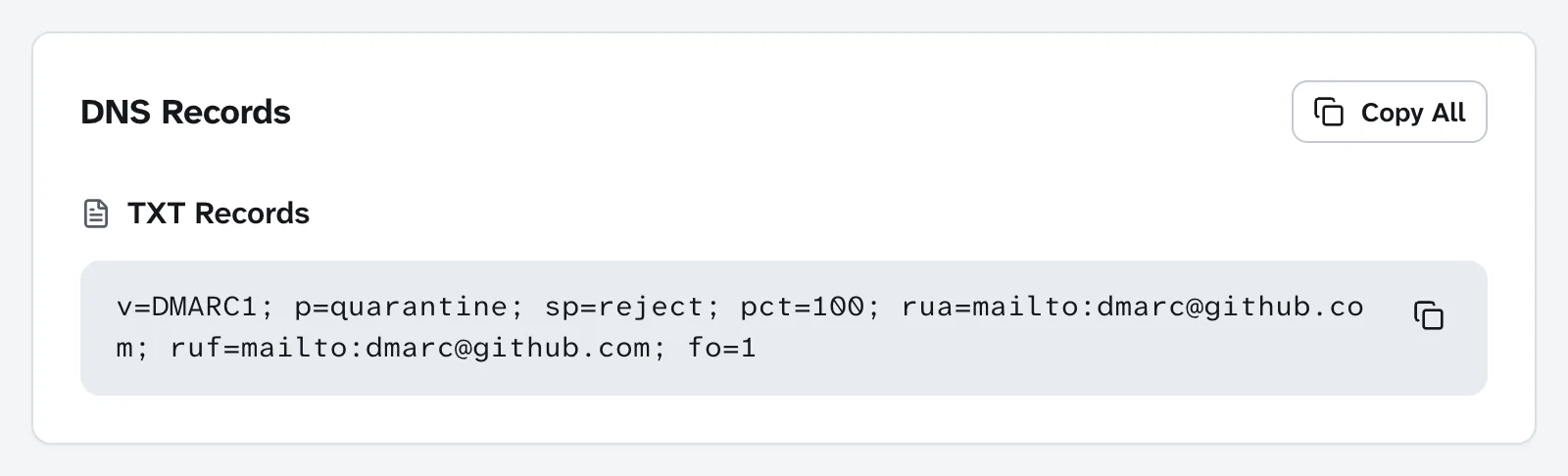
Reading it left to right: p=quarantine for github.com itself, sp=reject for any subdomain, pct=100 to apply the policy to all failing mail (the tag RFC 9989 has since retired), aggregate (rua) and failure (ruf) reports both going to dmarc@github.com, and fo=1, which asks for a failure report when either SPF or DKIM fails to produce an aligned pass, rather than only when both do.
Then look up a selector. s1._domainkey.github.com shows both halves of how a vendor DKIM setup works:
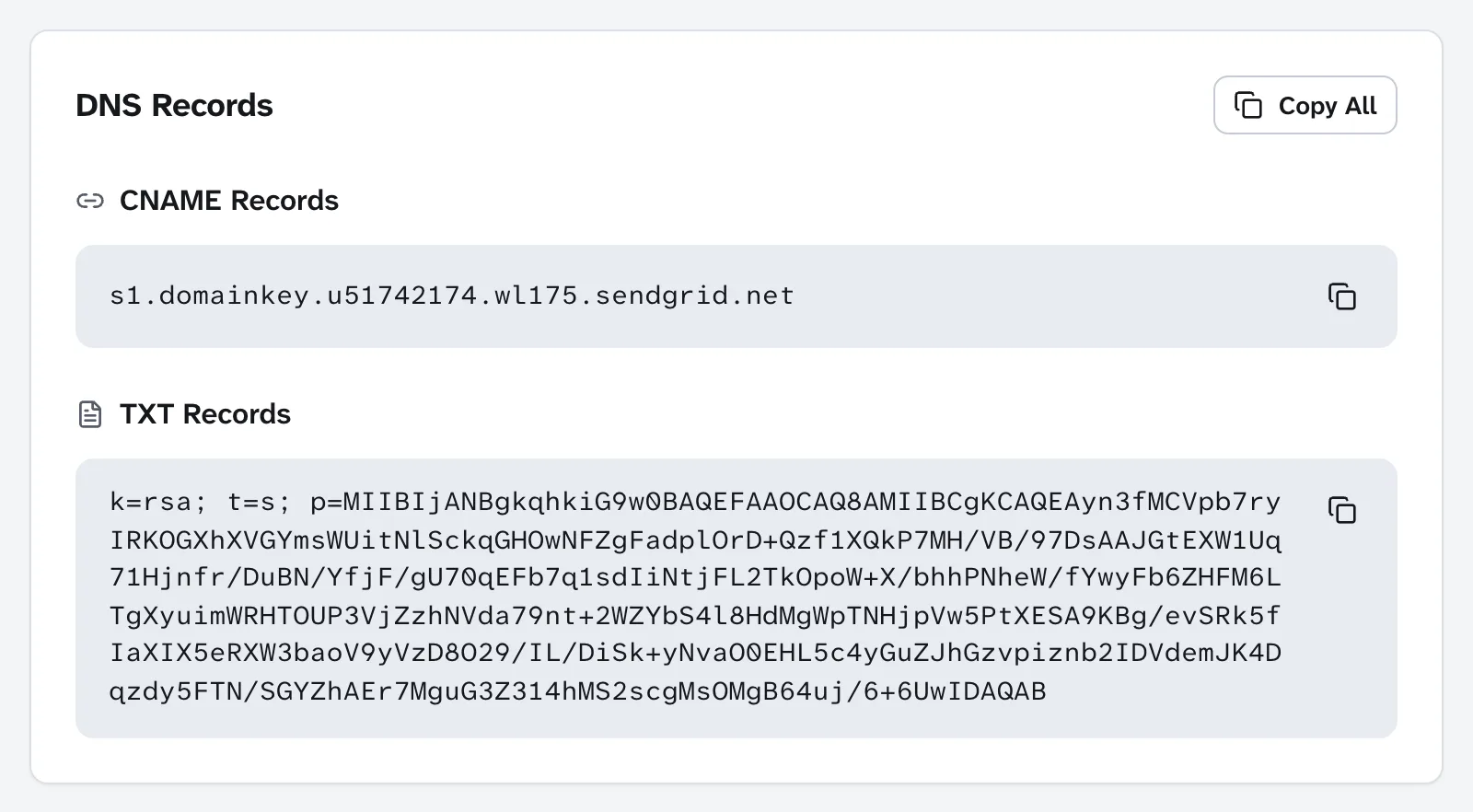
The CNAME hands the name to SendGrid, and the TXT record is the public key SendGrid publishes there. GitHub's DNS never contains the key. SendGrid can rotate it without anyone at GitHub touching a record. And any signature verified against this key necessarily says d=github.com, because that is the domain the receiver looked the key up under, which is exactly what makes it align.
For your own domain, look up the bare domain and read the TXT records for exactly one v=spf1 line. Domain Lookup joins split TXT strings the way a receiver does, so a long record reads as one line here even though dig shows it in pieces.
What to actually do
- List everything that sends as your domain. Your mailbox provider, the newsletter tool, the help desk, the billing system, the CRM, the website's contact form. Every one needs to pass SPF or DKIM as your domain.
- Keep one SPF record and count its lookups. Merge vendors into a single
v=spf1line. Count the includes, then count the includes inside them. If you are near 10, move a vendor to DKIM-only rather than adding another include. - Turn on custom DKIM at every vendor. It is the CNAME setup in their "domain authentication" or "sender authentication" settings. This is the step that makes alignment work, and it survives forwarding where SPF doesn't.
- Publish DMARC at
p=nonewith arua=address first. Read the aggregate reports for a few weeks. They will show you the senders you forgot. Then move toquarantine, thenreject. - Prefer
~allonce DMARC is enforcing. DMARC's policy is what receivers act on. A hard-allonly adds a way for forwarded mail to bounce before DMARC can look at DKIM. - Lock down domains that never send mail. Parked and redirect-only domains get spoofed too. Give them
v=spf1 -alland a DMARC record withp=reject.
If mail isn't arriving at your domain at all, that is a different record entirely: the MX, covered in WHOIS vs DNS vs MX.