robots.txt, sitemap, and JSON-LD: three files, three jobs
They answer three different questions, and the classic mistake — blocking a page in robots.txt to deindex it — does the exact opposite.
Three files decide whether a search engine can find, fetch, and understand your site, and each one answers a different question. robots.txt answers may I fetch this. sitemap.xml answers what exists here. JSON-LD structured data answers what does this mean. They look interchangeable from a distance, so people reach for the wrong one. The most common version of that mistake — blocking a page in robots.txt to keep it out of Google — does the opposite of what you want.
Three files, three questions
| robots.txt | sitemap.xml | JSON-LD | |
|---|---|---|---|
| Question | May I fetch this? | What exists here? | What does this mean? |
| Lives at | /robots.txt (fixed) | any path, usually /sitemap.xml | inside the page HTML |
| Talks to | the crawler's fetcher | the crawler's scheduler | the indexer's parser |
| Format | line-based text, RFC 9309 | XML, sitemaps.org 0.9 | JSON in a <script> tag |
They run at three different stages. robots.txt is read before a single page is fetched. The sitemap feeds the queue of what to fetch. JSON-LD is read after the fetch, when the page is being understood. Getting them confused means solving a scheduling problem with a fetch rule, or an indexing problem with a crawl rule.
robots.txt controls crawling, not indexing
robots.txt is the first thing a well-behaved crawler requests. It is a plain-text list of groups, each naming a User-agent and the paths that agent may or may not fetch. Here is the top of a real one:
$ curl -s https://github.com/robots.txt | head -12
# If you would like to crawl GitHub contact us via https://support.github.com?tags=dotcom-robots
# We also provide an extensive API: https://docs.github.com
User-agent: bingbot
Disallow: /ekansa/Open-Context-Data
Disallow: /ekansa/opencontext-*
Disallow: /account-login
Disallow: */tarball/
Disallow: */zipball/
Disallow: /Explodingstuff/
Disallow: /copilot/
Disallow: /copilot/c/
Disallow is prefix matching, not an exact path. Disallow: /copilot/ blocks /copilot/, /copilot/c/, and everything else that starts with those characters. That is also why Disallow: /admin blocks /administrator. Same prefix. RFC 9309 adds two special characters on top of the prefix rule: * matches any run of characters (see Disallow: */tarball/ above, which blocks that path under any user), and $ anchors the end of the path.
One directive you will see and should ignore: Crawl-delay. Bing and Yandex honor it; Googlebot does not, and never has. If you need to slow Googlebot down, return 500, 503, or 429 responses and it backs off on its own — the old Search Console crawl-rate control was retired in January 2024.
The word that matters most: robots.txt governs fetching. It says nothing about whether a URL appears in search results. That distinction is where most of the damage happens, and we will get to it.
sitemap.xml is a hint about what exists
A sitemap is a list of URLs you want discovered, each with an optional <lastmod>, <changefreq>, and <priority>. It is how a crawler finds pages that aren't linked from anywhere obvious. Big sites don't ship one giant file; they ship a sitemap index that points at the real sitemaps. Google's own is exactly that:
$ curl -sI https://www.google.com/sitemap.xml
HTTP/2 200
content-type: text/xml
content-length: 1879

$ curl -s https://www.google.com/sitemap.xml | head -6
<?xml version="1.0" encoding="UTF-8"?>
<sitemapindex xmlns="http://www.google.com/schemas/sitemap/0.84">
  <sitemap>
    <loc>https://www.google.com/gmail/sitemap.xml</loc>
  </sitemap>
The index pattern exists because a single sitemap has hard limits: 50,000 URLs and 50 MB uncompressed. Cross either ceiling and you split the file and list the pieces in an index. Equally important, a sitemap is a hint, not a command. Listing a URL does not guarantee it gets crawled or indexed; the crawler still decides. Google reads <lastmod> when it has proven honest over time and ignores <priority> and <changefreq> entirely, so don't spend effort tuning numbers no one reads.
JSON-LD explains what the content means
The first two files are about access and discovery. Structured data is about meaning. JSON-LD is a block of schema.org vocabulary dropped into the page inside a <script type="application/ld+json"> tag, telling the indexer "this page is a Product priced at $29.99" or "this is an Article by this author published on this date."
There are older ways to say the same thing. Microdata and RDFa weave the vocabulary into your HTML as extra attributes on existing tags. Google reads all three, but recommends JSON-LD, because it is a single self-contained block you can generate and inject without threading attributes through your visible markup. The one rule that overrides everything else: structured data must describe what is actually on the page. A 4.8-star rating in your JSON-LD that appears nowhere in the visible content is a policy violation, not a shortcut to stars in the results.
Where it goes wrong
Disallow: / left in from staging. It is one line, and it blocks the entire site. It lives in your staging environment for a good reason and then rides a deploy into production, where organic traffic quietly falls off a cliff. This is the first thing to check when rankings vanish overnight.
Blocking a page to deindex it. This is the big one. If you Disallow a URL, the crawler never fetches it, which means it never sees the noindex you were counting on. Worse, the URL can still be indexed from inbound links, and because Google couldn't read the page, it lists it with no description: "No information is available for this page." To remove a page from search, do the reverse of your instinct: allow the crawl and serve noindex, either as a <meta name="robots" content="noindex"> tag or an X-Robots-Tag HTTP header. Reserve robots.txt for things you want left un-crawled and don't care about indexing: faceted-search URLs, infinite calendars, internal search results.
Sitemaps that lie. A sitemap is a statement that these URLs exist and are canonical. Every entry that 404s, redirects, or points at a non-canonical variant erodes the crawler's trust in the whole file. Don't list a URL you wouldn't want indexed exactly as written.
Marking up content that isn't there. Review stars on a page with no reviews, a JSON-LD price that doesn't match the visible one. Google cross-checks structured data against the rendered page, and a mismatch can cost you the rich result or trigger a manual action.
Seeing it yourself
Of the three, robots.txt is the one people get wrong most and check least, largely because the prefix matching isn't obvious by eye. The safe move is to stop eyeballing it and test the exact path against the exact crawler you care about.
Paste your robots.txt into the tester (or fetch it live from a URL), pick a user-agent, and type a path. It reports allowed or blocked and names the directive that decided. Take the default example: Disallow: /admin/ and Disallow: /private/ for *, with Allow: /public/. Test /admin/settings and it comes back blocked, matched by Disallow: /admin/, because the path starts with that prefix even though settings never appears in the rules. Test /public/blog and it flips to allowed, matched by Allow: /public/.
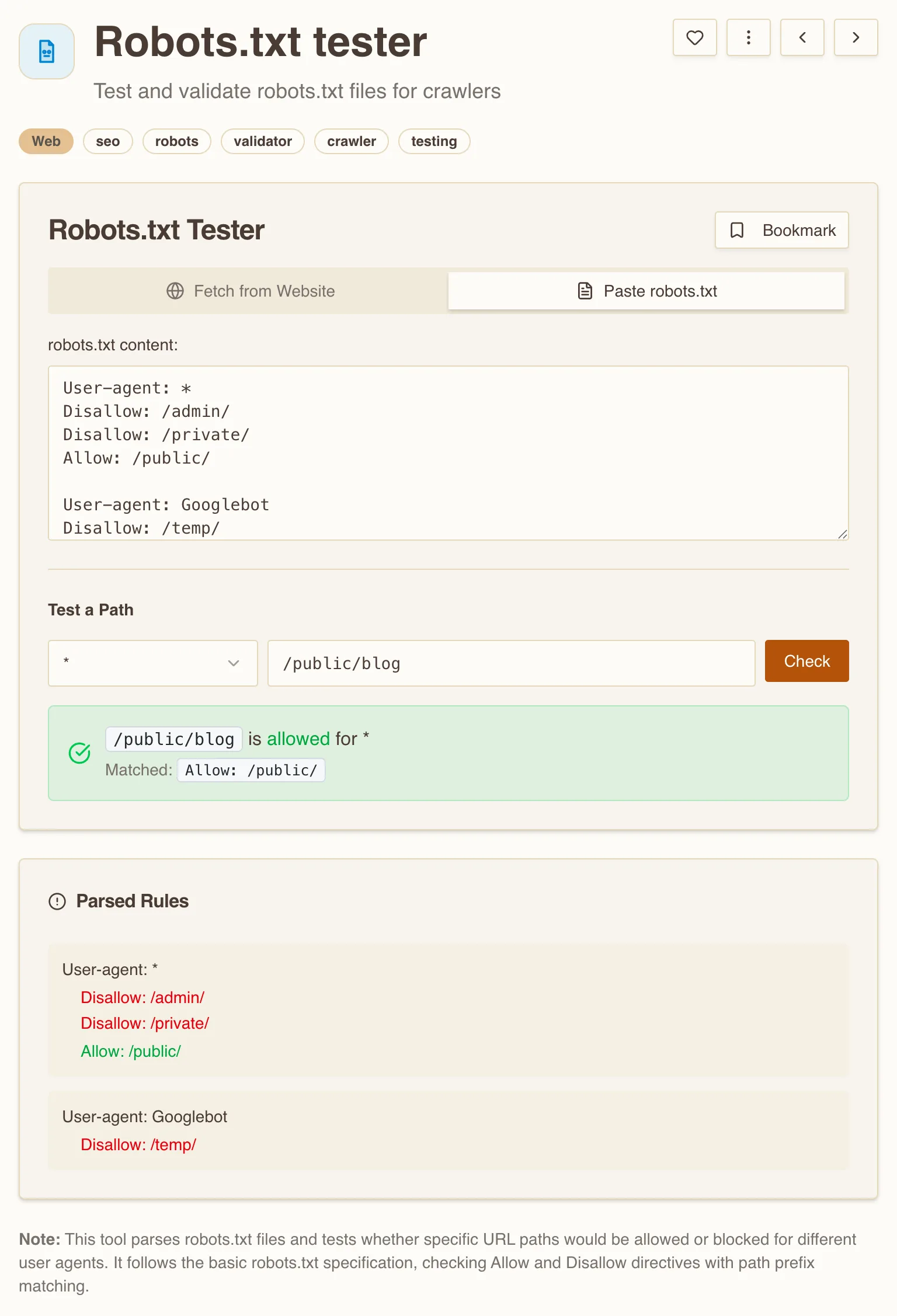
The Parsed Rules panel breaks the file into the groups each crawler will actually read, so you can confirm a directive lands in the group you meant. That is the fastest way to catch a Disallow that is one prefix too broad, or an Allow that never fires because a longer Disallow sits above it.
What to actually do
- Read your live robots.txt end to end. Confirm there is no stray
Disallow: /, then test the handful of paths you actually care about against the crawler you care about, and don't trust your eyes on prefix matching. - To remove a page from search, don't block it. Allow the crawl and add
noindex. Block in robots.txt only what you want left un-crawled. - Validate the sitemap and prove every URL is a canonical 200. The Sitemap.xml validator parses the file, counts URLs, flags malformed entries, and warns at the 50,000-URL ceiling.
- Keep structured data in sync with the page. Run the JSON-LD Validator against the live URL; it pulls every
<script type="application/ld+json">block and checks that each parses and carries@contextand@type. - Do a broader on-page pass. For the meta tags, headings, and canonical signals these three files don't cover, the SEO Checker reads them in one shot.
Three files, three questions. Keep them straight and each one does its own job. Muddle them and you will block what you meant to index, or index what you meant to hide.