WHOIS vs DNS vs MX: three problems, one symptom
"My domain is down" is really three separate questions with three separate tools. Knowing which one you are asking is most of the fix.
"My domain isn't working" is three different problems wearing the same costume. WHOIS tells you who owns the name and when it expires. DNS tells you where the name points. MX, a single DNS record type, tells you where its mail goes. Confuse them and you can burn an afternoon fixing the thing that was never broken.
The costs of getting it wrong are asymmetric. An expired domain is a five-minute renewal you keep putting off because you think the problem is DNS. A missing MX record is a one-line fix you never find because you keep re-checking your website, which is fine. Sorting the symptom into the right bucket is the whole game.
Three different questions
These three live in different systems and answer different questions. The table is worth memorizing before you touch anything.
| WHOIS | DNS | MX record | |
|---|---|---|---|
| Answers | Who owns it, when it expires | Where the name points | Where its mail is delivered |
| Lives at | the registrar and registry | the authoritative nameservers | one record type inside DNS |
| Protocol | WHOIS (port 43) or RDAP | DNS (port 53) | DNS (port 53) |
| Changes when | you renew, transfer, or update registration | you edit your zone | you edit one line of your zone |
| Query with | whois, RDAP | dig, host | dig MX |
WHOIS is a registration record, not part of DNS at all. It is metadata the registry and your registrar hold about the contract: who registered the name, through whom, and until when. That is why a WHOIS lookup keeps working even when the site is dark. The registration is a separate fact from where the name resolves.
$ whois github.com
   Registrar: MarkMonitor Inc.
   Creation Date: 2007-10-09T18:20:50Z
   Registry Expiry Date: 2026-10-09T18:20:50Z
   Domain Status: clientDeleteProhibited https://icann.org/epp#clientDeleteProhibited
   Domain Status: clientTransferProhibited https://icann.org/epp#clientTransferProhibited
   Domain Status: clientUpdateProhibited https://icann.org/epp#clientUpdateProhibited
   Registrant Organization: GitHub, Inc.
The single most useful field is Registry Expiry Date. The Domain Status codes are the second: those clientTransferProhibited-style flags are EPP status codes, the registry's locks on the name. A healthy domain carries a couple of client...Prohibited locks. A dying one carries clientHold, serverHold, redemptionPeriod, or pendingDelete, and those actively stop it from resolving.
You will notice a lot of WHOIS records look gutted now. Run the same query against a domain with a private registrant and the contact fields read DATA REDACTED:
$ whois cloudflare.com
   Registrar: Cloudflare, Inc.
   Registry Expiry Date: 2033-02-17T22:07:54Z
   Registrant Organization: DATA REDACTED
That is not a broken lookup. After GDPR took effect in 2018, ICANN's Temporary Specification required registrars to redact personal registrant data from public WHOIS. Corporate names like GitHub, Inc. often survive because a company name is not personal data; an individual's name, email, and address get blanked. The successor protocol is RDAP (Registration Data Access Protocol), standardized across IETF RFCs 7480–7484. It returns structured JSON instead of the free-text soup WHOIS emits, and it supports tiered access so verified requesters can see more than the public gets. As of early 2025, ICANN no longer requires gTLD registrars to run the legacy port-43 WHOIS service at all; RDAP is the designated replacement.
DNS answers a completely different question: where does the name point? The A record is the answer for web traffic.
$ dig +short A github.com
140.82.114.4
The NS records are the other half of the story, and the half people forget. They are the delegation: the list of nameservers the registry says are authoritative for this zone.
$ dig +short NS github.com
dns1.p08.nsone.net.
dns2.p08.nsone.net.
dns3.p08.nsone.net.
dns4.p08.nsone.net.
ns-1283.awsdns-32.org.
ns-1707.awsdns-21.co.uk.
ns-421.awsdns-52.com.
ns-520.awsdns-01.net.
MX is a DNS record type that answers where the domain's mail goes. It is edited in the same zone as everything else, which is exactly why people assume a mail problem is a DNS problem or vice versa.
$ dig +short MX github.com
0 github-com.mail.protection.outlook.com.
That leading 0 is a preference, not a priority ranking of quality. It is a 16-bit number (0–65535); a sending mail server tries the lowest value first, and when two records share a value it picks between them at random for load balancing. Lower means tried-sooner, nothing more. Cloudflare's zone shows the pattern clearly:
$ dig +short MX cloudflare.com
5 mxa-canary.global.inbound.cf-emailsecurity.net.
5 mxb-canary.global.inbound.cf-emailsecurity.net.
10 mxa.global.inbound.cf-emailsecurity.net.
10 mxb.global.inbound.cf-emailsecurity.net.
The two 5 hosts are the primary pair, tried first and balanced against each other. The two 10 hosts are the fallback for when both 5s are unreachable.
Two things about MX targets trip up almost everyone. First, the trailing dot. In github-com.mail.protection.outlook.com. that final dot is the DNS root, making the name fully qualified. It matters because in a zone file a name without a trailing dot gets your zone's origin appended. Write mail.example.com (no dot) as an MX target in the example.com zone and you have now pointed mail at mail.example.com.example.com, which does not exist. Second, an MX record must point to a name with an A or AAAA record, never to a CNAME. RFC 2181 §10.3 and RFC 5321 §5.1 both forbid it. The MX target above resolves straight to addresses:
$ dig +short A github-com.mail.protection.outlook.com.
52.101.11.9
52.101.40.6
A CNAME there is a configuration error that many mail servers will refuse outright.
Where it goes wrong
The user always reports the same thing: "the site's down" or "email stopped." Three unrelated causes hide behind that sentence.
Cause 1: the domain expired. WHOIS shows a Registry Expiry Date in the past or a clientHold/serverHold status. When a name lapses the registrar pulls it from the zone, so everything stops, web and mail together. No amount of DNS surgery helps, because the registry has stopped answering for the name. Renew first; nothing else matters until you do.
Cause 2: DNS is broken but the domain is fine. The registration is healthy, but the A record is wrong, or the delegation does not match reality. The classic version: you moved your DNS to a new provider and updated the records there, but the registrar still delegates to the old nameservers. Resolvers follow the registrar's delegation, land on a server that no longer holds your zone, and get stale or empty answers. The NS records the registrar publishes must match the nameservers actually serving the zone. When they diverge you get a lame delegation and inconsistent answers depending on which server a resolver happens to hit.
Cause 3: mail is broken but web is fine. DNS resolves, the site loads, and mail still bounces because the MX record is missing, points at a CNAME, or lost its trailing dot in the zone file. The website being up tells you nothing here; mail routing is a separate record that fails on its own terms. Senders will report no MX record or a delivery loop, and your A/NS checks will all look perfect.
Seeing it yourself
Start with the cheapest question, whether the name is even registered and paid up, because it rules out the most catastrophic cause in one lookup. Our WHOIS Lookup parses the raw record into the fields that matter instead of making you grep 60 lines of registry boilerplate.
Type a domain into the Domain Name field, hit Lookup, and the WHOIS Information card breaks the record into labelled sections: Registration Details (the registrar and its URL), Important Dates (when the registration was last updated), Domain Status, and Name Servers. The creation date, the expiry date, and the rest of the raw registry response sit in the Raw WHOIS Data box at the bottom.
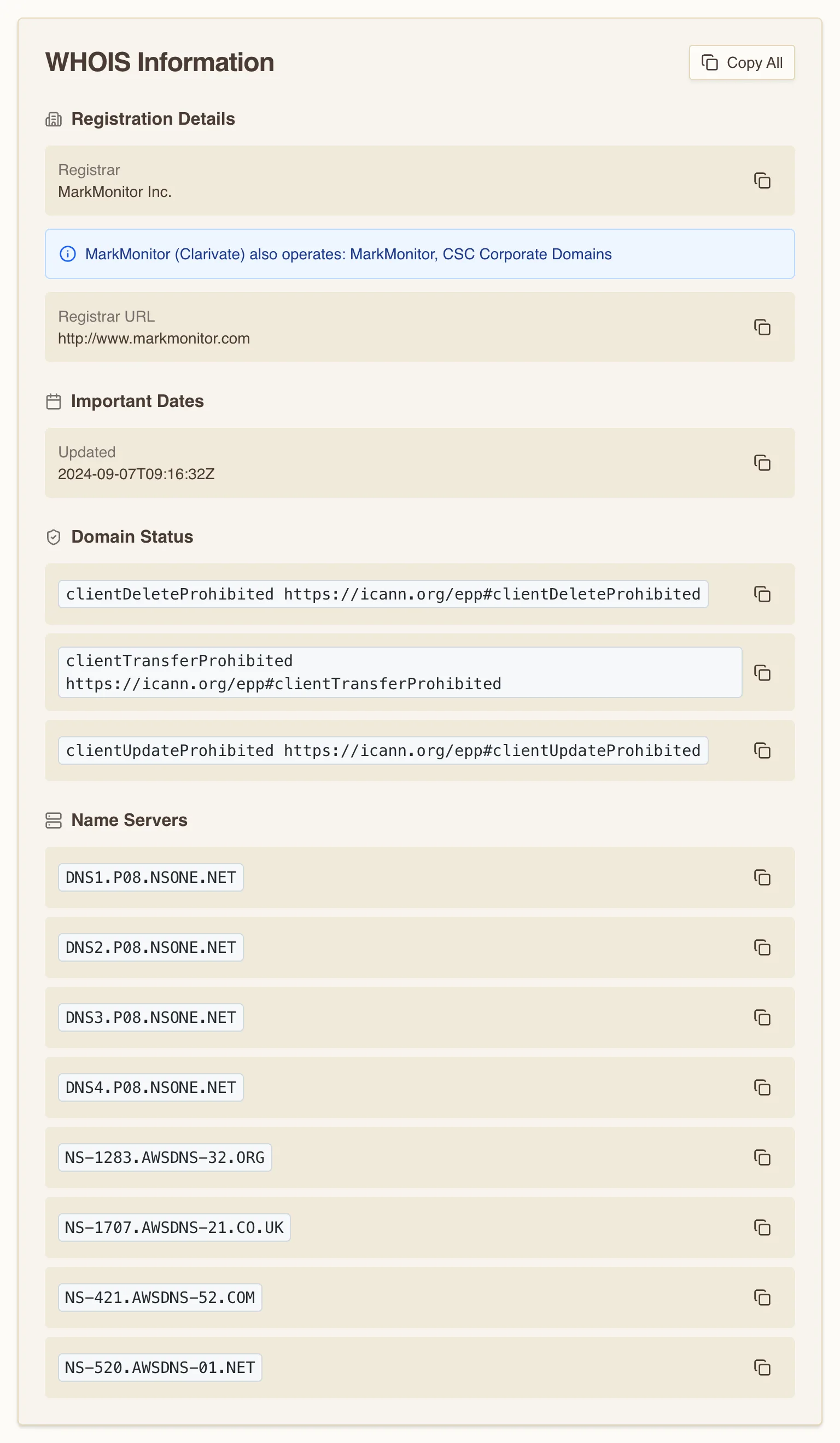
Run another domain through it and the parsed card keeps the same shape — registrar, status locks, name servers — with no registrant or contact section anywhere. That is the flip side of the redaction from earlier: the personal contact data WHOIS once exposed is not in what the tool can pull, so there is nothing for the card to show. When you do want the raw registry response, it sits verbatim in the Raw WHOIS Data box.
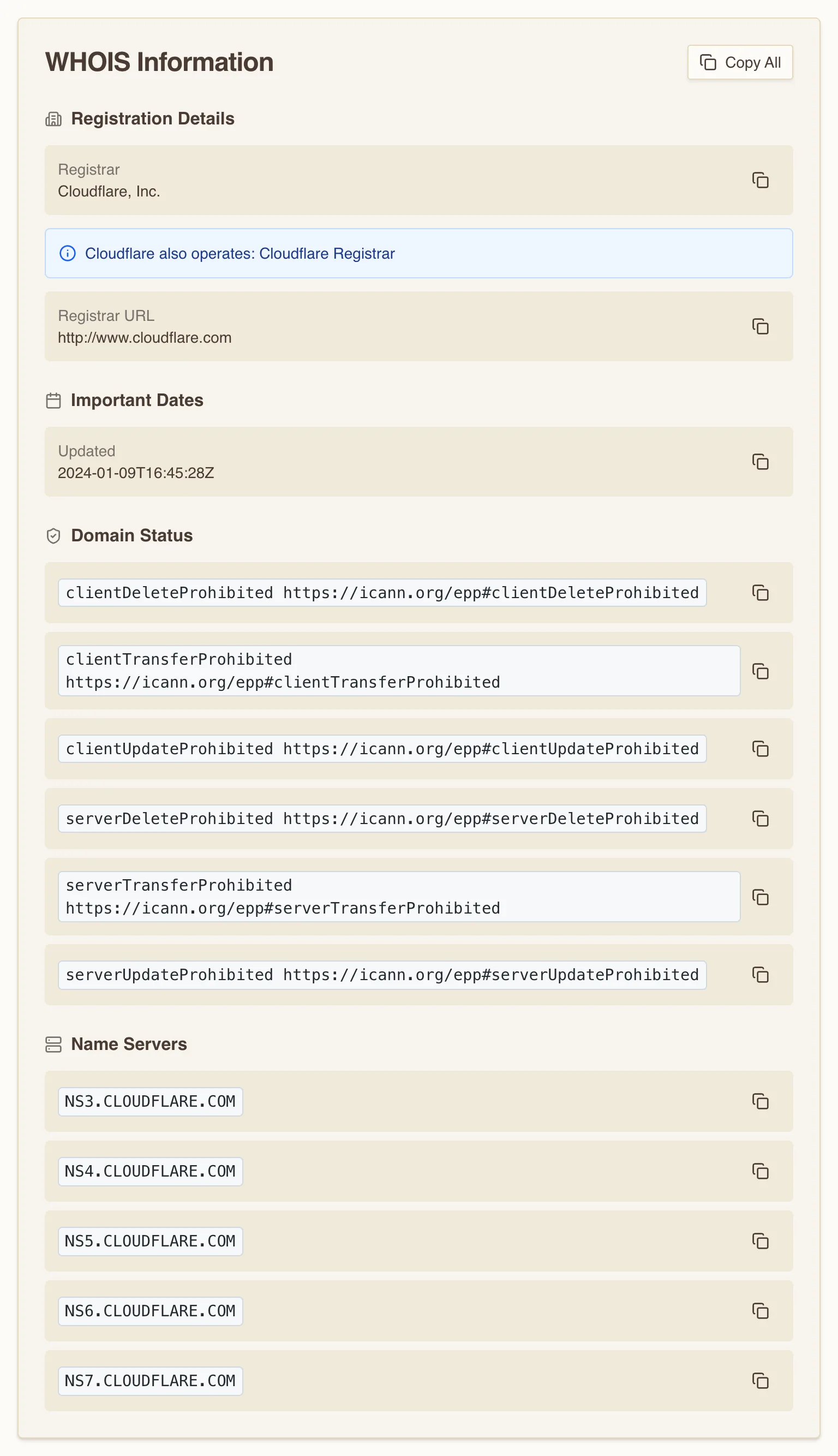
The status codes answer the "is it on hold" question outright — a clientHold or serverHold jumps out at a glance. For the expiry date, drop to the Raw WHOIS Data box and read the Registry Expiry Date line. The Name Servers section answers a second question: it shows the delegation the registry hands out, which is exactly what you cross-check when you suspect the DNS-provider mismatch from Cause 2.
What to actually do
Work the causes in cost order — the disaster first, the fiddly one last.
- Is it registered and paid up? Run the WHOIS lookup above and read two fields: the expiry date and the status codes. A past expiry or a
clientHold/serverHoldflag means renew now; stop debugging DNS. - Does the name resolve where you expect? Check the
Arecord and confirm theNSrecords the registrar delegates to match the provider actually hosting your zone. Domain Lookup shows the full record set (A, NS, MX, and more) in one view. - Did you recently change something and half the world still sees the old value? That is propagation, bounded by each record's TTL, not a bug. Confirm the new answer from multiple locations with What is my DNS before you assume the change failed.
- Mail bouncing while the site loads? Pull the MX records, confirm every target resolves to an
A/AAAAname rather than a CNAME, and check that trailing dots are intact in your zone file.
The trick is not knowing more about any one of these systems. It is spending the first two minutes deciding which of the three you are actually looking at.