301, 302, 307, 308: picking a redirect, and why chains cost you
Every redirect answers two questions. Is this move permanent, and may the browser turn a POST into a GET? Most redirect bugs come from answering only the first.
Lawrence Kampa
· 9 min read
Most people pick a redirect code by asking one question: is this move permanent? That gets you to 301 or 302, and for a page someone clicks a link to, it is usually enough. It stops being enough the moment the redirected request is a form submission, an API call, or a URL a browser has already cached. There are four common redirect codes because there are two questions, and the second one is the one that loses data.
Two questions, four codes
| Method may change (POST becomes GET) | Method must stay the same | |
|---|---|---|
| Permanent | 301 Moved Permanently | 308 Permanent Redirect |
| Temporary | 302 Found | 307 Temporary Redirect |
The left column is history. HTTP/1.0 defined 301 and 302 as "same request, new address," but browsers implemented 302 by re-requesting the new URL with GET, whatever the original method was. That behavior became too widespread to fix, so the spec gave up and wrote it down. RFC 9110 still says, for both 301 and 302, that for historical reasons a user agent MAY change the request method from POST to GET.
The right column is the repair. 307 arrived with HTTP/1.1 as "302, but really keep the method," and 308 followed in 2015 as the permanent equivalent. A browser that receives a 307 or 308 in response to a POST re-sends the POST, body and all, to the new URL.
There is a fifth code worth knowing: 303 See Other always means "go GET this other URL." It is the right answer after a form submission, so that refreshing the result page doesn't re-submit the form. That pattern has a name, Post/Redirect/Get, and 303 is the code built for it.
Permanent means "remember this"
The permanence column isn't documentation. Two different systems act on it.
Browsers cache permanent redirects. RFC 9110 makes 301 and 308 heuristically cacheable: without any Cache-Control header, a browser is allowed to store the redirect and skip asking your server next time, and in practice they hold onto them for a long time. 302 and 307 are only cached if you say so explicitly.
Search engines move the URL. Google's documentation is direct about it: 301 and 308 are a strong signal that the target should become the canonical URL, and search results show the target. 302, 303, and 307 are followed, but the source URL usually stays in results, because you told Google the move is temporary. An instant <meta http-equiv="refresh" content="0"> counts as permanent, a delayed one as temporary, and JavaScript redirects only work if rendering succeeds, which is why Google recommends them only when a server-side or meta refresh redirect isn't possible.
| Code | Permanent | POST survives | Browser caches by default | Google shows in results |
|---|---|---|---|---|
| 301 | yes | no | yes | target |
| 302 | no | no | no | source |
| 303 | no | no (always GET) | no | source |
| 307 | no | yes | no | source |
| 308 | yes | yes | yes | target |
Where it goes wrong
The POST that arrives empty. A form posts to http:// while the site forces https://, or to /contact while the server canonicalizes to /contact/. The server answers 301, the browser follows with a GET, and the form data is gone. The visitor sees the page reload and nothing happen. With DEBUG on, Django refuses to let this pass silently, and its error message is the best explanation of the bug anyone has written:
RuntimeError: You called this URL via POST, but the URL doesn't end in a slash and you have APPEND_SLASH set. Django can't redirect to the slash URL while maintaining POST data. Change your form to point to localhost:8000/contact/ (note the trailing slash), or set APPEND_SLASH=False in your Django settings.
The fix is to point the form at the final URL, so no redirect happens. Where a POST endpoint genuinely has to move, use 308.
The 301 that won't die. You removed a redirect from the server config, and your browser keeps following it. Nothing is wrong with the server. The browser cached the 301, exactly as allowed, and isn't asking anymore. Your visitors' browsers did the same, and you can't clear their caches. This is why careful teams ship a new redirect as a 302, confirm it does what they meant, and only then switch it to 301.
The loop. Chrome shows ERR_TOO_MANY_REDIRECTS; Firefox says "The page isn't redirecting properly." Two rules disagree, and each sends the request back to the other until the browser gives up (the Fetch standard caps it at 20). The classic version is Cloudflare's Flexible SSL mode: Cloudflare talks to your origin over plain HTTP, your origin redirects HTTP to HTTPS, Cloudflare requests it over HTTP again. WordPress produces the same loop behind a reverse proxy that terminates TLS: WordPress sees a plain HTTP request, redirects it to HTTPS, and the proxy hands it back as plain HTTP. WordPress's own docs call it an infinite redirect loop, and the fix is teaching WordPress to trust the proxy's X-Forwarded-Proto header.
The 307 your server never sent. Chrome DevTools shows 307 Internal Redirect from http:// to https:// with a Non-Authoritative-Reason: HSTS header. That is the browser enforcing HSTS before any request leaves the machine. Your server's real answer to http:// might be a 301, a 302, or nothing at all; DevTools won't tell you. Check from outside the browser.
The chain nobody designed. Every site migration adds a rule, and nobody goes back to update the old ones. /blog/?p=123 redirects to /blog/post-slug, which redirects to /articles/post-slug, which redirects to the https://www version. Each hop is a full request and response, and a hop to a new hostname adds a DNS lookup and a TLS handshake on top. Google follows up to 10 hops before giving up on a URL, but it has to spend crawl effort on every one, and your visitors on a slow phone connection feel each of them.
Seeing it yourself
A browser hides chains. It follows every hop, shows you the final page, and the only evidence is the address bar. To see the actual chain, you need something that makes the request without following it, and shows you the status code and Location header at each step.
Here is what http://microsoft.com returned when we checked it:
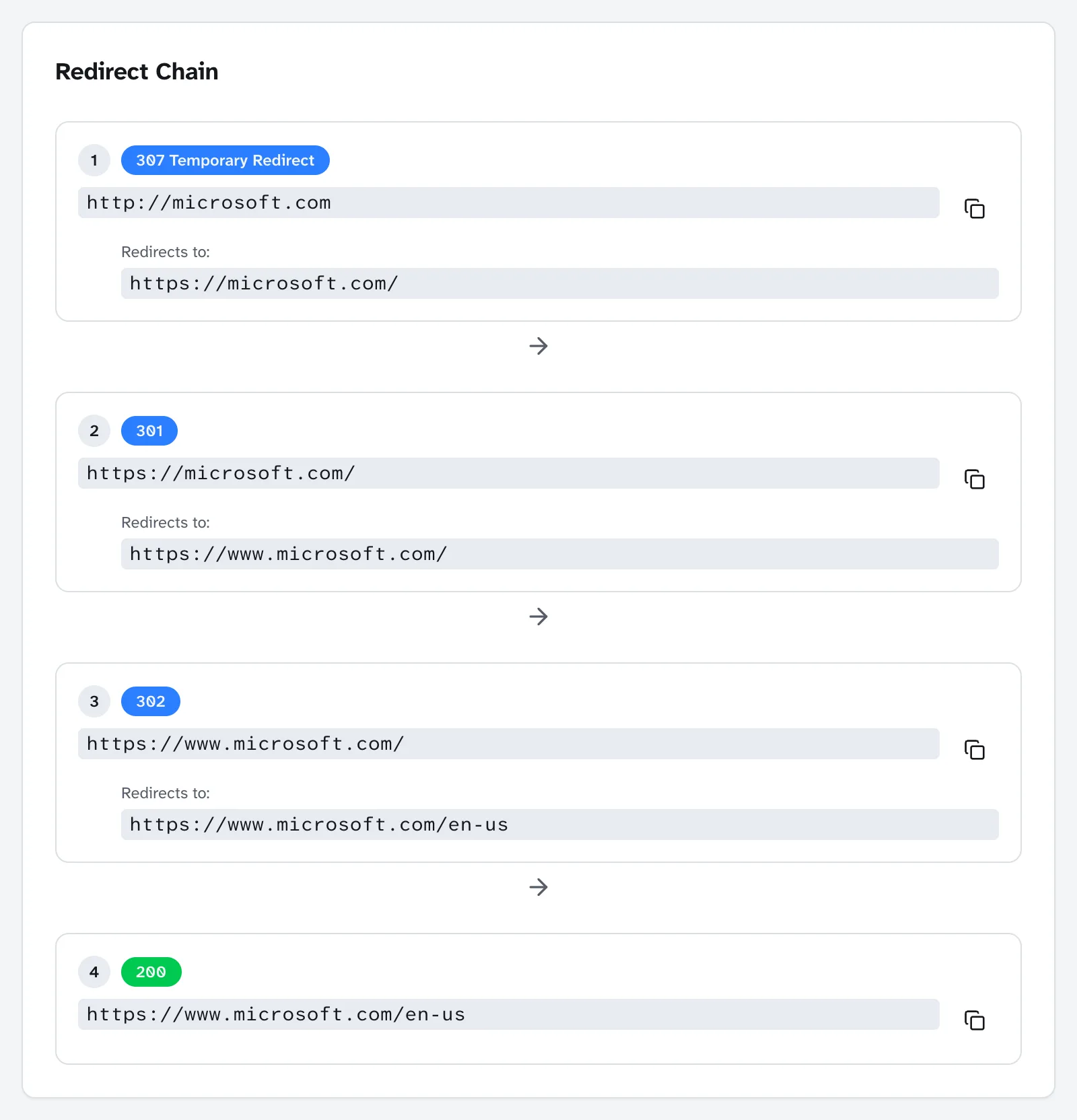
Three hops, three different codes, and each one is a different decision, probably owned by a different system:
- 307,
http://tohttps://. The scheme upgrade, done as a temporary redirect that preserves the method. - 301,
microsoft.comtowww.microsoft.com. The hostname canonicalization, done as permanent. - 302,
/to/en-us. A locale choice, correctly temporary, because a visitor from somewhere else should land somewhere else.
None of these is wrong on its own, and the 302 is arguably necessary. But the first two could be one hop: a single rule sending http://microsoft.com straight to https://www.microsoft.com/.
The two-hop version of that is extremely common, and even GitHub ships it. http://www.github.com goes to https://www.github.com/ and only then to https://github.com/, because the HTTPS upgrade and the www-removal are separate rules, and they run one after the other:
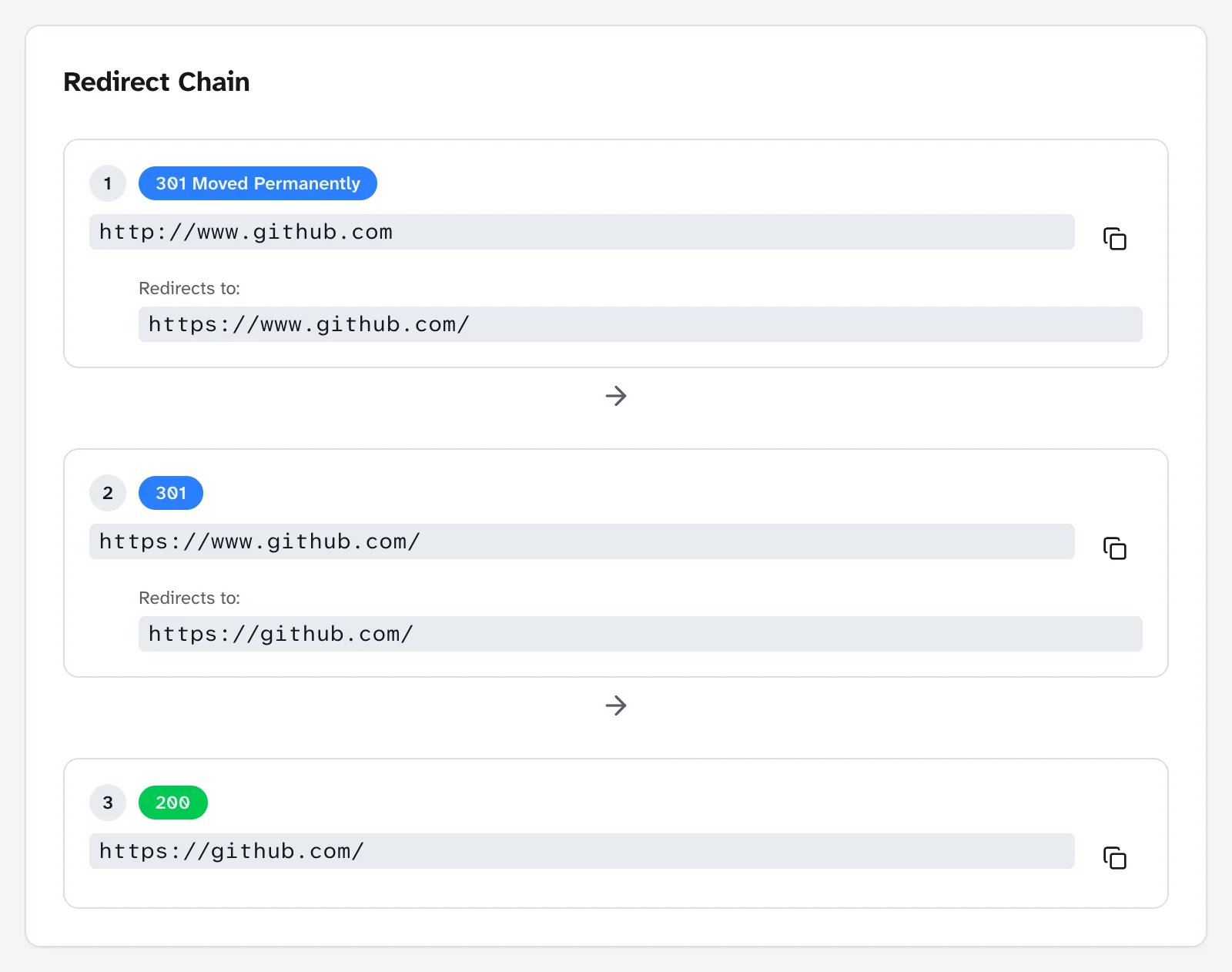
A caveat about reading results: the checker sends HEAD requests with its own user agent and no cookies. If a hop comes back 403 or 405 where your browser gets a page, the server is treating automated requests differently, not redirecting. And redirects that depend on language headers or cookies, like that locale hop, can differ from what you see in your own browser.
What to actually do
- Test the four front doors.
http://,http://www.,https://, andhttps://www.versions of your homepage. Every one should reach the canonical URL in a single hop. Fix the ones that take two by combining the scheme and hostname rules into one. - Pick the code by both questions. 301 for a page that has permanently moved. 308 for anything that might receive a POST: API endpoints, form handlers, webhooks. 302 or 307 for moves you intend to undo. 303 after a form submission.
- Ship 302 first, switch to 301 when you're sure. A wrong 302 is fixable. A wrong 301 lives in browser caches you can't reach.
- Flatten after every migration. Point each old URL straight at its final destination, and update internal links so they don't redirect at all. A sitemap that lists redirecting URLs is its own problem; see robots.txt, sitemap, and JSON-LD.
- Check from outside the browser whenever DevTools shows a 307 from
http://. That is HSTS talking, not your server. If you need a reminder of what a code means, the HTTP status codes reference covers all of them.
A redirect is a small instruction with a long memory. Choose the code for the request you will receive, not only the move you are making.