WP-Cron isn't cron: why scheduled posts miss their time
WordPress has no clock. It checks its to-do list when someone visits, so a quiet site, or a well-cached one, quietly stops doing its scheduled work.
Lawrence Kampa
· 8 min read
The post was scheduled for 6:00 AM. At 9:40 the Posts screen still lists it with Missed schedule in red, and by the time you've opened the editor to publish it by hand, it has published itself. Nothing is broken, exactly. WordPress doesn't have a scheduler that wakes up at 6:00. It has a list of things that are due, and it only reads that list when someone requests a page.
How WP-Cron actually runs
WordPress stores its schedule in the database, in a single option named cron: a list of timestamps, each with the hooks due at that moment. Nothing watches that list. Instead, WordPress checks it on every request it serves:
- A request comes in, from a visitor, a logged-in admin, or a bot.
- WordPress looks at the earliest timestamp in the list. If nothing is due yet, it carries on. Since WordPress 6.9 this check happens on
shutdown, after the page has been sent; earlier versions did it before the page went out. - If something is due, it takes a lock and fires an HTTP request to itself, a loopback
POSTto/wp-cron.php?doing_wp_cron=<timestamp>, with a 0.01-second timeout andblockingoff, so the visitor isn't kept waiting. - That loopback request runs everything that is due.
The lock is a transient that keeps a second request from spawning another run for 60 seconds (WP_CRON_LOCK_TIMEOUT). The WordPress developer handbook puts the consequence plainly: WP-Cron "is only triggered on page load". A system scheduler runs on a clock. WP-Cron runs on traffic.
| System cron | WP-Cron | |
|---|---|---|
| Triggered by | the clock (crond) | an uncached PHP request |
| Runs when nobody visits | yes | no |
| A missed time | skipped | runs late, on the next request |
| Depends on | nothing but the server | a working loopback request |
The handbook frames the third row as a feature, and it is: tasks are queued and will run eventually, even if you can't say when. The trouble is "eventually" is a poor fit for some of what's in the queue.
What is waiting on it
Scheduled posts are the visible part. Each one is a single publish_future_post event set for its publish time. The less visible parts are core's own housekeeping:
wp_version_check,wp_update_plugins, andwp_update_themesrun every 12 hours. Background auto-updates only start from inside a cron run ofwp_version_check, so if cron isn't running, auto-updates aren't either.wp_scheduled_deleteempties posts that have sat in the trash longer than 30 days (EMPTY_TRASH_DAYS).delete_expired_transientsclears expired cached data out of the options table.wp_site_health_scheduled_checkruns Site Health's own tests weekly.
Then every plugin adds its own: backup jobs, email digests, feed imports, membership renewals, abandoned-cart reminders. All of it waits for someone to load a page.
Where it goes wrong
Nobody visits. A small business site gets no traffic overnight. The 6:00 AM post publishes when the first visitor arrives at 9:40, which is also when that night's backup starts. The handbook's own example is a task scheduled for 2:00 PM that runs at 5:00 PM because no page loaded in between.
Everybody visits a cached page. This is the counterintuitive one. Full-page caching (Varnish, an nginx FastCGI cache, a CDN serving HTML) answers requests without starting PHP at all. Your analytics show thousands of visitors, and WordPress hears from almost none of them. The better the cache, the worse WP-Cron behaves.
The loopback is blocked. The spawn step is your server making an HTTP request to its own public URL, and plenty of things stop that: HTTP basic auth on a staging site, a firewall or WAF rule that doesn't expect traffic from the server's own IP, or DNS inside the host resolving the site's name to an address that doesn't answer. Site Health reports this as Your site could not complete a loopback request, sometimes with The loopback request returned an unexpected http status code, 403. When cron falls behind, Site Health also raises A scheduled event is late or A scheduled event has failed, naming the hook.
DISABLE_WP_CRON with nothing behind it. Managed hosts often set define( 'DISABLE_WP_CRON', true ); and run a real cron job for you. Migrate the site to a new host, keep the wp-config.php, lose the host's cron job, and nothing scheduled runs ever again. No error, because nothing is failing. Nothing is being asked.
Give WordPress a real clock
The fix is to stop relying on page loads and have the operating system trigger WordPress on a fixed interval. It takes two changes.
First, stop WordPress spawning cron on page loads. In wp-config.php, above the line that says to stop editing:
define( 'DISABLE_WP_CRON', true );
This only stops the spawn on page loads. wp-cron.php still runs events when requested directly, which is what the next step does.
Second, add a crontab entry. If the server has WP-CLI, run due events through it. Edit the crontab of the user PHP runs as, so files the jobs create get the right owner:
sudo crontab -u www-data -e
*/5 * * * * /usr/local/bin/wp cron event run --due-now --path=/var/www/example.com --quiet
Use the absolute path to wp. Cron runs with a minimal PATH, usually /usr/bin:/bin, so a command that works in your shell can fail silently from cron. WP-CLI is the better trigger because it runs PHP directly: no web server timeout, no loopback, no firewall, no cache in the way.
Without WP-CLI, request the file over HTTP the way the WordPress handbook shows, with wget:
*/5 * * * * wget -q --delete-after https://example.com/wp-cron.php
Read the schedule before you save it
Five fields: minute, hour, day of month, month, day of week. The one mistake everyone makes once is in the first field. */5 means every fifth minute. A bare 5 means at minute 5, once an hour. Both are valid, both save without complaint, and only one of them does what you meant.
Paste the expression into the crontab generator before it goes anywhere near a server, and read the sentence it gives back:
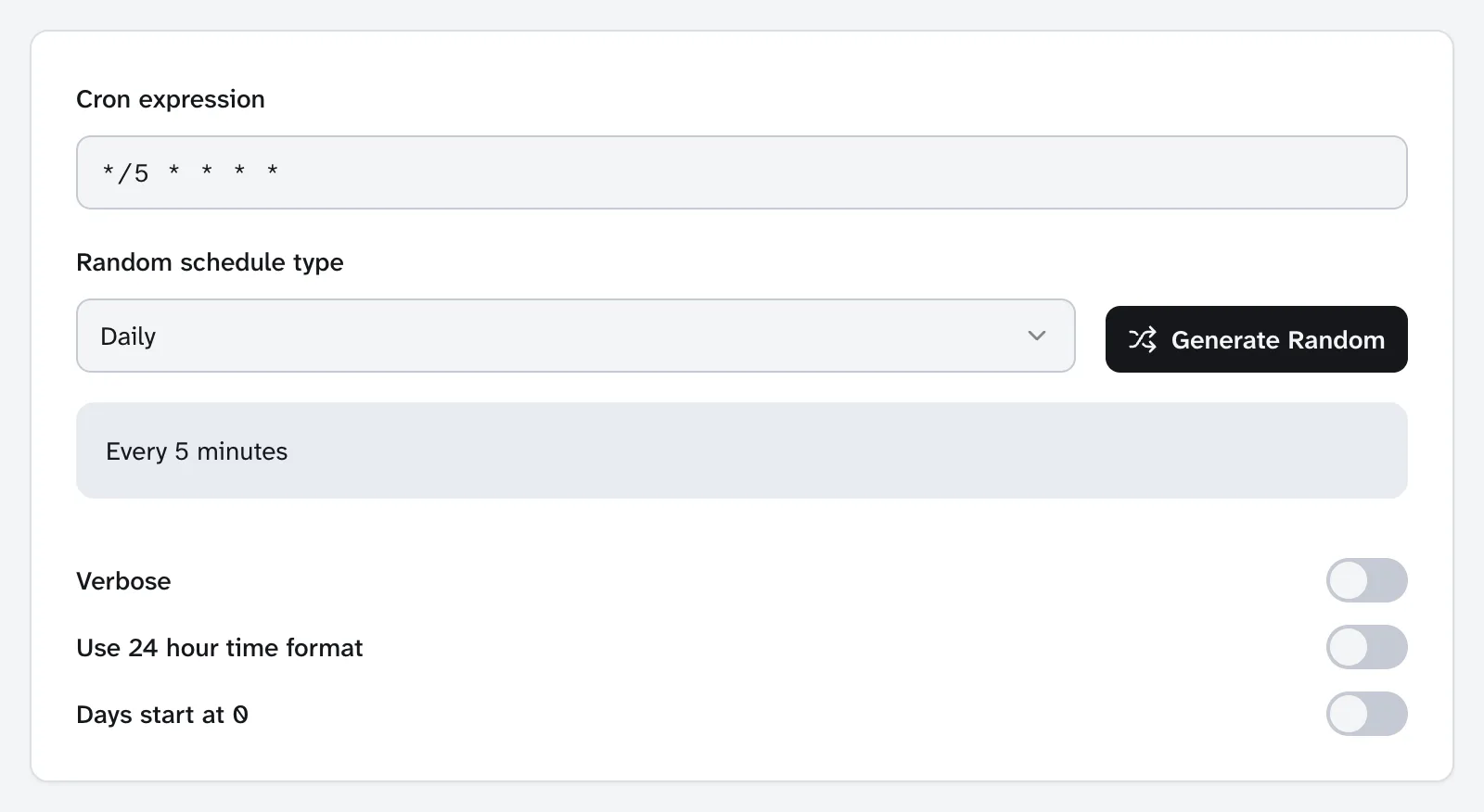
Now drop the */:
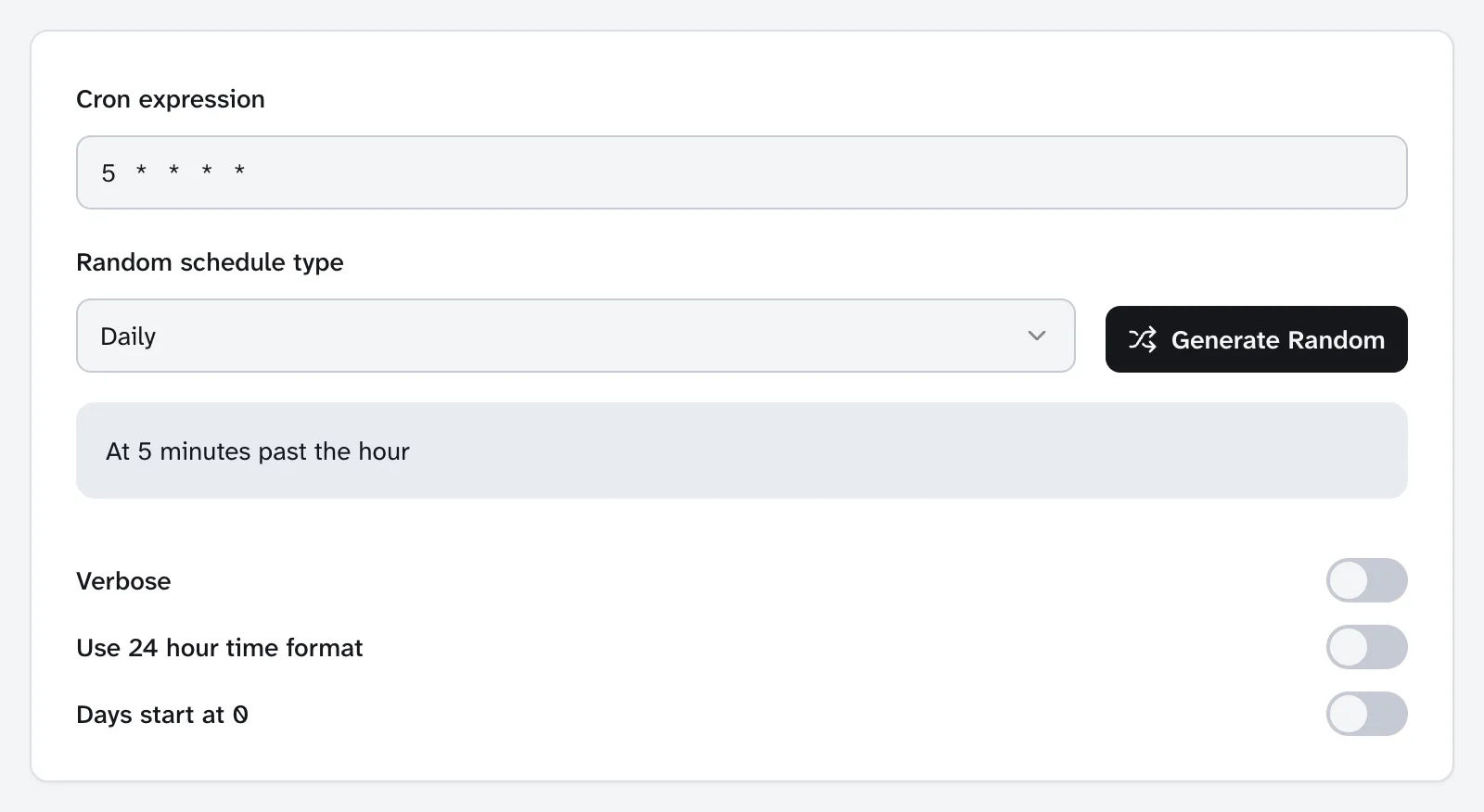
"At 5 minutes past the hour" is twelve times less often than you intended, and your scheduled posts would publish up to an hour late, every time, with nothing in any log to tell you why.
The interval is a question of how late you can tolerate. Every 5 minutes means a 9:00 post is live by 9:05. The handbook's own examples use every 15 minutes and once a day. Every minute is fine on a server you control, and pointless if nothing on the site is that time-sensitive.
What to actually do
- Check whether cron is healthy now. Tools → Site Health, and look for loopback or scheduled-event warnings. With WP-CLI,
wp cron testshould reportSuccess: WP-Cron spawning is working as expected.(Once you've setDISABLE_WP_CRON, it errors that spawning is disabled instead, which is then what you want.) - Look at what is waiting.
wp cron event listshows every hook with its next run time. Anything whose next run is in the past is overdue. Without shell access, the WP Crontrol plugin shows the same list in the admin. - If the site is low-traffic or fully cached, move to a real cron job.
DISABLE_WP_CRONplus a crontab entry, every 5 or 15 minutes. - After a host migration, check
wp-config.phpforDISABLE_WP_CRON. If it's set, confirm something is actually triggering cron on the new server. - Verify with a test post. Schedule one 10 minutes out and confirm it publishes on time without anyone visiting.
If auto-updates were silently not running, the update screen will have a backlog waiting for you. Our earlier piece on maintenance reports covers turning that update window into something a client can read.